Email notifications are available for restaurant temporary override updates, failed transmission, outages, and end of day reports. These can be added under any restaurant by going to that restaurant's settings, under Email Notifications and adding the requested emails under each field.
- Navigate to the Restaurants list in the left hand margin and open the restaurant list
- Use the filters to find the restaurant
- Open restaurant
- Open "Email Notifications"
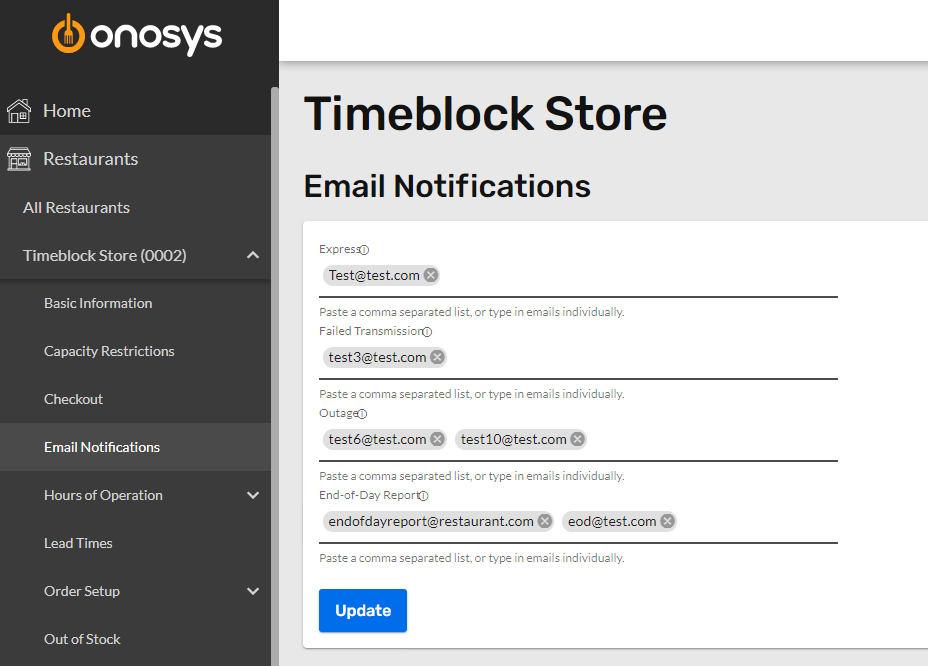
- Add emails for the requested notifications by typing or pasting the email(s) in the corresponding text fields. To save an email, press the space bar, comma, or enter to save the email. Below is a brief description of what each notification is used for:
- Express - Temporary override updates. If a temporary override is input, the emails in this field will receive a notification of the updates.
- Failed transmission - The emails in this field will receive a notification if any of these three fail for an order:
- Primary Order Transmission
- Payment Post-Auth
- Third-Party Delivery Scheduling
- Outages - If there is an outage detected for the primary transmission type (POS, Printer, etc.) of the restaurant, the emails in this field will receive a notification.
- End of Day Reports - End of day reports containing a high-level summary of orders will be sent to the emails in this field.
- Press Update to save the email notification settings.